Sneo
Run models bigger than your GPU.A local LLM engine and coding agent for Windows, on NVIDIA and AMD cards. It keeps the experts a model calls most in VRAM, the rest in RAM, and has the GPU and the CPU share every token.One RTX 3090, one 70.6 GB model
Writing code
Reading a 24,054 token prompt
First token on a short chat
Model on 24 GB of VRAM and 34 GB of RAM
Writing speed
Tokens per second while answering, higher is betterReading speed
Prompt tokens per second, higher is betterTime to first token
Seconds until the answer starts, lower is betterMeasured on Nov 15, 2026 on the main test PC: RTX 3090 24 GB, Intel i9-12900K, 96 GB DDR5-6400, Windows 10. Qwen3.8-Flash-Next IQ3_XXS, 128K context window, thinking on, temperature 0.6, up to 256 output tokens, median of four runs per test.
Side by side with other engines
Against Strata, on the same 70.6 GB model
Sneo starts answering first at every prompt size: 0.19 s against 0.26 s on a short chat, 1.0 s against 1.5 s on a code review and 7.7 s against 8.4 s on a 24,000 token prompt. It also writes 4 to 8% faster on short chats, code and long prompts, while Strata still writes 6% faster after a very long prompt. And Sneo did it with half the RAM, 34 GB against 67 GB.
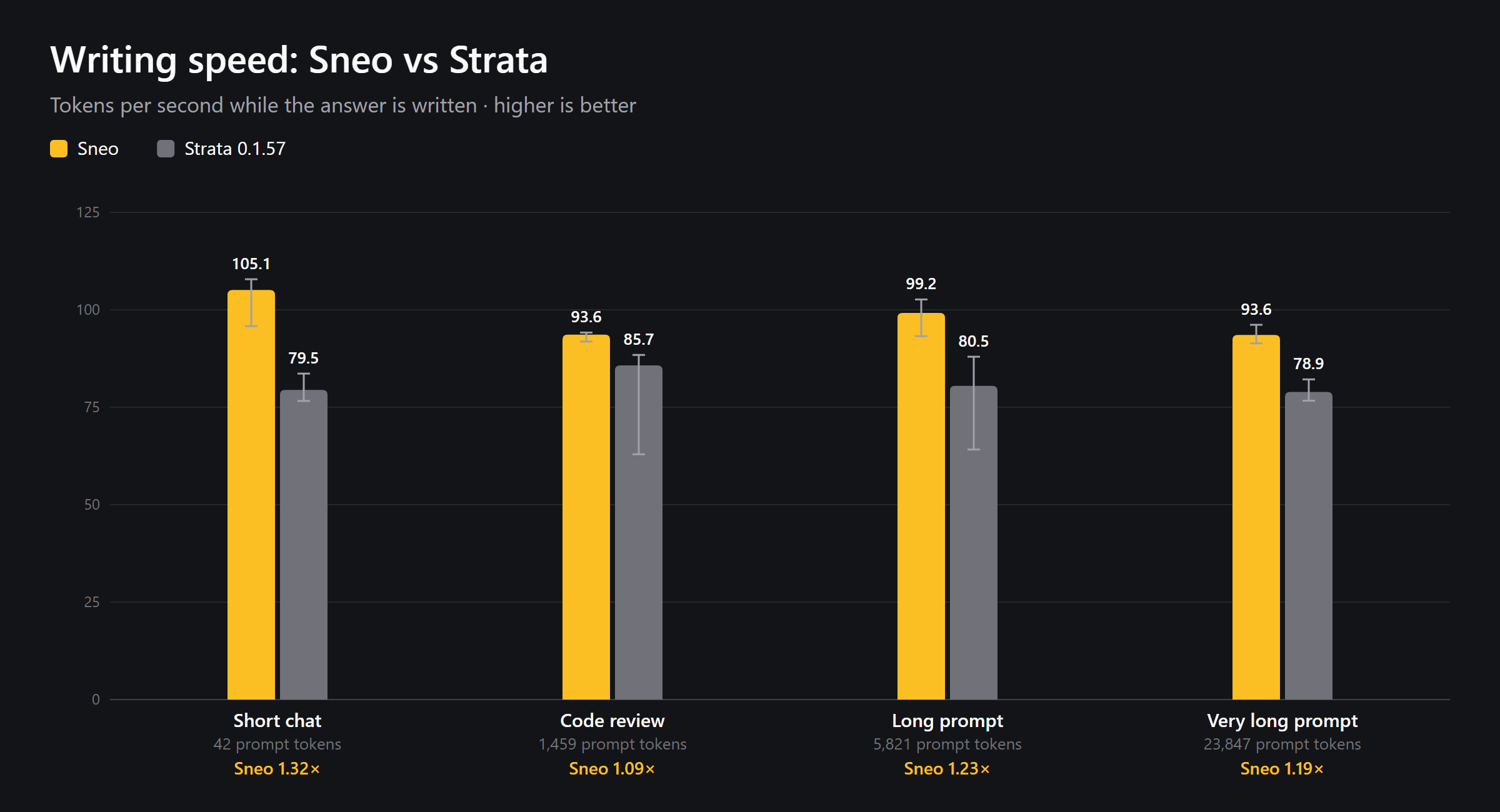
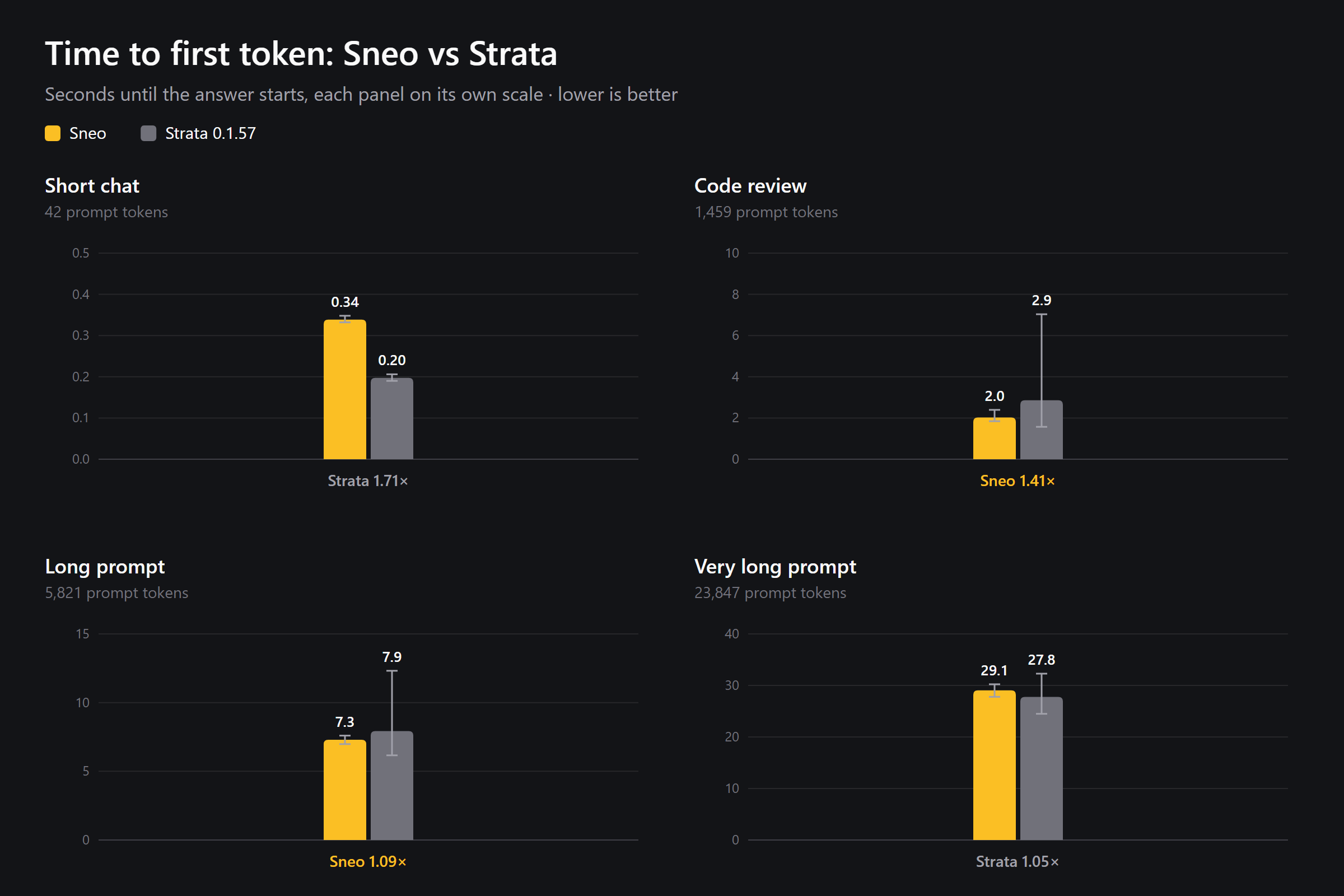
Both engines ran on the same PC with one RTX 3090 and the same Qwen3.8-Flash-Next IQ3_XXS files, 70.6 GB, with a 128K context window. Strata used the settings of its own app, with the experts kept in RAM and an int8 KV cache. Sneo started from the heat map it ships with.
Thinking on, temperature 0.6, top_p 0.95, top_k 20, up to 256 tokens per answer and a fresh prompt every time. The engines took turns on the GPU, Sneo, Strata, Sneo, Strata, four requests for each prompt size.
Each column is the median of four runs and the thin line goes from the slowest to the fastest one. The line under each group says which engine was faster and by how much.
Measured on Nov 15, 2026 on the main test PC: RTX 3090 24 GB, Intel i9-12900K, 96 GB DDR5-6400, NVMe SSD, Windows 10. En español: velocidad de escritura y tiempo al primer token.
Against Ollama, model by model
Sneo runs the models Ollama already downloaded straight from its files, so both engines read exactly the same weights. Sneo writes faster on qwen3.6:35b by 15 to 66%, on qwen3.5:4b by 17 to 21% and on qwen3.6:27b by 1 to 13%, and on gemma4:31b it is ahead on short chats and code and even after a long prompt. Ollama still writes faster on gemma4:26b with code and long prompts, and on qwen3.8:27b with code and long prompts, and it starts answering first on the dense 27B and 31B models.
qwen3.6:35b
Mixture of experts · 35B| Prompt | Sneo writes | Ollama writes | Sneo starts | Ollama starts |
|---|---|---|---|---|
| Short chat | 249.8 | 150.1 | 0.05 s | 0.10 s |
| Code | 245.8 | 165.8 | 0.33 s | 0.51 s |
| Long prompt | 191.9 | 166.3 | 0.94 s | 1.84 s |
qwen3.5:4b
Dense · 4B| Prompt | Sneo writes | Ollama writes | Sneo starts | Ollama starts |
|---|---|---|---|---|
| Short chat | 196.9 | 162.2 | 0.06 s | 0.06 s |
| Code | 191.6 | 162.2 | 0.24 s | 0.23 s |
| Long prompt | 184.7 | 157.2 | 0.93 s | 0.76 s |
qwen3.6:27b
Dense · 27B| Prompt | Sneo writes | Ollama writes | Sneo starts | Ollama starts |
|---|---|---|---|---|
| Short chat | 75.3 | 71.1 | 0.30 s | 0.19 s |
| Code | 84.1 | 74.5 | 1.30 s | 1.13 s |
| Long prompt | 76.3 | 75.4 | 5.06 s | 4.10 s |
qwen3.8:27b
Dense · 27B| Prompt | Sneo writes | Ollama writes | Sneo starts | Ollama starts |
|---|---|---|---|---|
| Short chat | 67.5 | 54.4 | 0.29 s | 0.19 s |
| Code | 72.6 | 77.5 | 1.31 s | 1.13 s |
| Long prompt | 66.7 | 74.0 | 5.10 s | 4.11 s |
gemma4:26b
Mixture of experts · 26B| Prompt | Sneo writes | Ollama writes | Sneo starts | Ollama starts |
|---|---|---|---|---|
| Short chat | 183.4 | 181.9 | 0.09 s | 0.08 s |
| Code | 180.8 | 194.4 | 0.40 s | 0.45 s |
| Long prompt | 140.0 | 178.8 | 1.58 s | 1.69 s |
gemma4:31b
Dense · 31B| Prompt | Sneo writes | Ollama writes | Sneo starts | Ollama starts |
|---|---|---|---|---|
| Short chat | 61.2 | 53.5 | 0.18 s | 0.26 s |
| Code | 62.9 | 61.1 | 2.45 s | 1.68 s |
| Long prompt | 52.6 | 53.4 | 10.59 s | 6.74 s |
Writing speed in tokens per second, higher is better, and seconds until the answer starts, lower is better; the faster engine in each column is highlighted. Same PC and settings for both: thinking on, temperature 0.6, top_p 0.95, top_k 20, up to 256 tokens per answer, a 32K context window, two runs per prompt, and the engines took turns on the GPU. The prompts were a 42 token chat, a 1,459 token code review and a 5,818 token document (1,632 and 6,940 tokens with the Gemma tokenizer). Ollama measured on Nov 15, 2026, Sneo with its engine of Nov 16.
One PC, one or two NVIDIA cards
Main test PC
Your NVIDIA cards
Measured with Sneo on Nov 15, 2026. Without a usable NVIDIA card the engine runs on the CPU.
What makes it fast
Experts where they count
A heat map picks the experts that start in VRAM, about 200 of 512 per layer on a 24 GB card. The next ones wait in pinned RAM, where the GPU reads them over PCIe, and the CPU computes the rest at the same time, so neither waits for the other.
Learns from your chats
Every 32 tokens the experts the answer uses most take the place of the coldest ones in VRAM, and the heat map keeps what your sessions use for the next start.
Guesses ahead
The model's own draft layer proposes up to three tokens and one pass checks them all, about 25 to 30% faster writing on code and long prompts. With exact routing the text is the same as without it.
Reads long prompts fast
Prompts go through the model in blocks of up to 8,192 tokens on tensor cores, and each expert that is not in VRAM crosses PCIe once per block. A 24,000 token prompt reads in about 7.5 seconds on an RTX 3090.
Remembers the conversation
When a message continues the last one, only the new tokens are read. Snapshots at the end of the system prompt and of the last message cover regenerated answers and resent histories too.
Long chats keep their speed
Keys and values are stored in int8, so a 128K context fits next to the experts. When a chat outgrows its starting room, the context reuses memory the expert cache gives back, and writing keeps its speed.
Everything in the app, and what each part does
Sneo comes as a desktop app for Windows with the engine inside. You chat, run the agent on your code and pick models in one window, and your other tools can use the same engine through its APIs.
Work with the model
chatCoding agent
Reads, searches, edits and runs your projects, and can hand parts of a task to subagents. It understands the tool names other agents use, so models trained on them still call the right tools. To change a few lines it sends only those lines, not the whole file.
Send while it works
Add an instruction, a correction or a picture while the agent is working. It reads it at its next step without stopping what it was doing.
Every change side by side
Each step the agent takes shows up in a timeline. Every edit opens with the removed lines in red and the added lines in green, with the changed words marked, so you see what happened to each file.
Code editor
Open a project in the workspace and read or edit its files right next to the chat.
Live status
The chat always says what the model is doing: reading the prompt, with the new and reused tokens and its speed, or writing a tool call, with the tool, the file and how far it got. Every answer ends with its writing and reading speed.
Reverse engineering with IDA and Ghidra
The agent drives IDA and Ghidra directly through small bridges: it decompiles functions, follows cross references, callers and vtables, searches strings and bytes, and renames and retypes what it works out. It can also map a whole subsystem and search the decompiled code by meaning.
Reads pictures
Attach images and the model looks at them with its own picture reader, the mmproj file next to the model. On a second card the reader costs nothing while the model writes.
Agents on several models
Give each agent its own conversation and its own model: Sneo on your PC, a second local model, Claude, OpenAI, DeepSeek or any chat API like OpenAI's. A command center talks to every agent or to one, answers pass from agent to agent, and a team run splits a task between them and merges the result, drawn live.
From your phone
Turn on Phone and scan the code: the phone gets a page you can add to its home screen to chat with the agent, approve what it asks and load models. Each phone has its own key, only your home network or a VPN like Tailscale can reach it, and one button opens the port in Windows Firewall when the page does not load.
Set it up
setupModel catalog
Browse models from Hugging Face inside the app. Downloads resume where they stopped, and Sneo recommends the size that fits your VRAM and RAM.
Models you already have
Models you already downloaded with Ollama show up in the list, and Strata or any folder with GGUF files can be picked as the models folder. They run straight from those files, so nothing is copied or downloaded twice.
Memory on your terms
Nothing loads until the first message. Free memory gives VRAM and RAM back in one click, and an optional setting keeps the whole model in RAM so experts never wait for the SSD.
English or Spanish
One setting switches the whole app, menus and agent answers included, with no restart.
Files it makes by itself
After a model loads, Sneo builds its draft layer and, when the experts do not fit in RAM, an expert pack the SSD reads in one go. Both run in the background at low disk priority.
Sized for your PC
Sneo sizes VRAM and RAM for your PC on its own and decides how many experts go to each. The Pool view shows the limits it picked and lets you change them.
Two models at once
Load a second model next to the first one. On the same card the first one makes room with the video memory you choose and gets it back when the second unloads, and the two take turns writing, which measured faster than writing together.
Steady speed
When another program takes video memory and Windows moves part of the model to shared RAM, Sneo notices and loads it again by itself, so writing goes back to full speed instead of staying slow for the rest of the session.
Connect it
apiOpenAI compatible API
POST /v1/chat/completions on your own PC, with streaming, tools and tool calls, for any app or library made for that API.
Anthropic compatible API
POST /v1/messages and count_tokens, with thinking, text and tool use blocks, so tools made for that API can run on your own GPU.
Pool your PCs
Join a second PC over your network or Tailscale. Its GPU takes the first layers of the model and the answer comes out the same as on one PC. It pays off when the model does not fit in the main PC.
Recipes
Save your tuned settings and heat map in one file. Share it, or import one made on another PC for the same model.
Models and hardware
Qwen3.8-Flash-Next
512 experts per layer, the model in our benchmarksQwen3.8-Flash-Next Coder
256 experts per layer, made for codeQwen3.6-35B-A3B
Mixture of expertsQwen3.8, Qwen3.6 and Qwen3.5
Dense modelsGemma 4
Mixture of experts and denseGGUF files of these families load as they are. Models you already have in Ollama show up by themselves, and for Strata or any folder with GGUF files you pick that folder as the models folder, so nothing is downloaded twice.
Made by one developer
Oscar Santana
I'm a developer from the Dominican Republic and I write Sneo on my own: the engine in C++ with its own CUDA kernels, and the app and its agent in React and Node. It is free and open source to help others.
Get Sneo
Download the zip, unzip it and run start.bat. The engine, its tools and the app come built, and the first start gets what is missing on its own and sizes VRAM and RAM for your PC.
Buy me a coffeeWindows 10 or 11 · NVIDIA GTX 10 series or newer, or AMD Radeon · 32 GB of RAM · MIT license